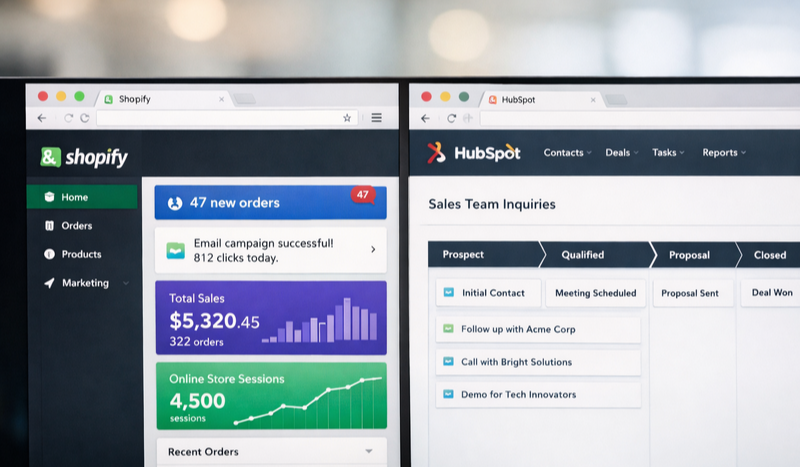
HubSpot with Shopify: The Ultimate SEO and Ecommerce Website Build
13:30
Last month, a DTC skincare brand came to us with a familiar problem. Their Shopify store was generating solid sales, but their content marketing felt disconnected... like it lived on a different planet from their product pages. They were running HubSpot for email and CRM, Shopify for products, and a WordPress blog that nobody remembered to update. Three platforms, three logins, zero cohesion. Sound familiar?
Pairing HubSpot with Shopify creates the ideal website architecture for brands that need serious SEO firepower alongside robust ecommerce functionality. Your core website and content hub lives in HubSpot - where the SEO tools are genuinely best-in-class - while your product catalog and checkout experience runs on Shopify through a subdomain. It's the best of both worlds without the compromises.
As a Platinum HubSpot partner and Shopify partner based in Texas serving clients internationally, we've built this exact setup for dozens of brands. Here's why it works and how to make it work for you.
What is the HubSpot with Shopify Website Structure?
Think of it like a well-designed house. HubSpot is your main residence - the living room, kitchen, bedrooms, the spaces where people spend time and you make an impression. This is where your homepage, about page, service pages, blog, and landing pages live. Shopify is your attached retail space - purpose-built for transactions, inventory management, and the checkout experience.
In technical terms, your primary domain (yourbrand.com) points to HubSpot CMS, while your Shopify store runs on a subdomain (shop.yourbrand.com or store.yourbrand.com). Visitors move seamlessly between them, and to them, it feels like one cohesive site. Behind the scenes, each platform does what it does best.
This architecture isn't new, but it's become the gold standard for a reason. Shopify handles the complex stuff - payment processing, inventory sync, shipping calculations, tax compliance - while HubSpot handles the strategic stuff: content that ranks, forms that convert, and analytics that actually tell you what's working.
Why HubSpot SEO Tools Beat the Competition
Here's something most ecommerce brands don't realize until it's too late: Shopify's native SEO capabilities are... limited. You can edit title tags and meta descriptions, sure. But advanced technical SEO? Content optimization? Topic cluster strategy? You're mostly on your own, hunting for apps that may or may not play nice together.
HubSpot built SEO into the platform's DNA. Not as an afterthought or a plugin, but as a core feature set that marketing teams actually use.
What Makes HubSpot's SEO Tools Different?
The Topic Clusters tool is the standout feature. It visually maps your content strategy around pillar pages and supporting content, showing you exactly where the gaps are. Google's algorithm rewards this kind of topical authority, and HubSpot makes it nearly impossible to build content without a strategic framework.
Real-time optimization recommendations appear as you write - not vague suggestions, but specific actions. "Your focus keyword doesn't appear in your H1." "This page has no internal links." "Your meta description is 47 characters too long." It's like having an SEO consultant looking over your shoulder, minus the hourly rate.
According to HubSpot's 2024 State of Marketing report, companies using integrated SEO tools see 55% more organic traffic growth compared to those using standalone SEO software.
The content strategy tool also integrates directly with your analytics, so you're not bouncing between platforms to understand what's actually driving results. One dashboard shows keyword rankings, traffic trends, and conversion data. For website design and UX, this integration is invaluable.
Setting Up Your HubSpot and Shopify Website Structure
Getting this architecture right from the start saves months of headaches later. Here's the framework we use with clients.
Step 1: Domain Configuration
Your primary domain (yourbrand.com) connects to HubSpot CMS. All your brand pages, content, and marketing landing pages live here. Create a subdomain for Shopify - we typically recommend "shop.yourbrand.com" because it's intuitive for users and clean for tracking purposes.
Important: Don't use a subfolder structure (yourbrand.com/shop/) unless you're prepared for significant technical complexity. Subdomains keep the platforms cleanly separated while maintaining brand cohesion.
Step 2: Navigation and User Experience
Your navigation should feel seamless across both platforms. Match your header and footer styling exactly between HubSpot and Shopify - same fonts, colors, menu structure. Users shouldn't notice they've moved between systems.
Link your "Shop" navigation item to your Shopify subdomain. On Shopify, ensure your logo links back to your HubSpot homepage (yourbrand.com), not the Shopify storefront. Small details, but they matter for both UX and SEO.
Step 3: Connect the Data with Unific
Here's where most HubSpot admins start losing sleep: keeping customer data synchronized between platforms. Someone buys on Shopify, but that purchase history needs to flow into HubSpot for email segmentation, lead scoring, and sales follow-up.
Unific solves this elegantly. It's the integration layer that syncs Shopify orders, customers, and products directly into HubSpot - in real time, with historical data included. No more CSV exports or manual reconciliation.
Pro Tip: Unific can save HubSpot admins 5-10 hours per week by eliminating manual data entry and sync checks between platforms. If you're managing both systems, sign up for Unific before you build - retrofitting the integration later is always messier.
The time savings compound quickly. Instead of troubleshooting why customer records don't match, your team focuses on building content strategy and optimizing campaigns.
Optimizing Both Platforms for SEO and AEO
Answer Engine Optimization (AEO) is the new frontier. AI assistants like ChatGPT, Perplexity, and Google's AI Overviews are pulling content to answer user questions directly. Your content needs to work for both traditional search and these AI-powered answer engines.
HubSpot SEO Optimization Checklist
Your HubSpot site handles the heavy SEO lifting. Focus here first.
Build topic clusters around your core products and services. If you sell skincare, create pillar content around "skincare routines" with supporting posts on ingredients, skin types, and specific concerns.
Use the SEO recommendations panel on every page. Don't publish until you've addressed the critical items.
Create FAQ sections with proper schema markup. HubSpot modules make this straightforward.
Optimize for featured snippets by including direct-answer paragraphs near the top of relevant content.
Internal linking matters - every new post should link to 2-3 related pieces and your key service pages.
Your brand identity should shine through in all this content. SEO isn't just technical - it's about building trust and recognition.
Shopify SEO Optimization Checklist
Shopify's SEO capabilities are more limited, so focus on fundamentals.
Product titles should include primary keywords naturally. "Hydrating Face Serum with Hyaluronic Acid" beats "Hydrate 3.0 Serum."
Product descriptions need 150+ words minimum. Include usage instructions, ingredients, and benefits - AI engines love comprehensive product information.
Collection pages are your category SEO opportunity. Write unique introductory content for each collection.
Image alt text on every product image. Be specific: "woman applying hydrating face serum to cheek" not "product image."
URL structure - edit handles to be clean and keyword-rich.
SEO Element
HubSpot Approach
Shopify Approach
Blog Content
Primary platform - use topic clusters
Avoid - redirect to HubSpot blog
Product Pages
Link to from content
Full optimization with schema
Landing Pages
Build all campaign pages here
Use only for promotions
Technical SEO
Built-in tools and recommendations
Limited - use apps carefully
Analytics Integration
Native dashboards
Sync via Unific to HubSpot
How Does This Structure Help with Answer Engine Optimization?
AI search engines are hungry for authoritative, well-structured content. They're pulling from sources that demonstrate expertise and provide clear, direct answers. This HubSpot-Shopify setup positions you perfectly.
Your HubSpot content hub builds topical authority. When you've published 30 interconnected pieces about skincare - all properly linked, all answering real questions - AI systems recognize you as a credible source. That's not something you can fake with thin product descriptions alone.
Structure your content with AEO in mind:
Open articles with 2-3 sentence direct answers
Use question-based H2 and H3 headings that match natural language queries
Include definitions early ("What is..." sections)
Cite statistics and link to authoritative sources
Create dedicated FAQ pages and sections with schema markup
HubSpot's CMS makes implementing structured data straightforward. Combined with their SEO recommendations, you're building content that both Google and AI assistants can parse and trust.
Why Not Just Use One Platform for Everything?
This is the question we get most often. "Why add complexity? Can't Shopify do it all? Can't HubSpot handle ecommerce?"
Shopify-only builds struggle with content marketing at scale. The blogging features are basic, the SEO tools are surface-level, and you end up adding apps upon apps to replicate what HubSpot does natively. Your marketing team gets frustrated. Your content gets siloed.
HubSpot-only builds using their native commerce features work for simple catalogs and digital products. But if you're running serious ecommerce - hundreds of SKUs, complex inventory, multiple shipping options, subscription products - Shopify's infrastructure is purpose-built for that complexity. HubSpot's isn't.
The hybrid approach means each platform does what it was designed to do. Your custom web development stays manageable because you're working within each platform's strengths rather than fighting their limitations.
What Does Implementation Actually Look Like?
A typical build timeline for the HubSpot-Shopify architecture runs 8-12 weeks, depending on content migration and design complexity. Here's the general flow:
Weeks 1-2: Discovery and architecture planning. Define the sitemap, URL structure, and integration requirements. Get Unific configured early.
Weeks 3-5: HubSpot CMS build. Design templates, build the theme, create page layouts. Focus on the homepage, key service/category pages, and blog architecture.
Weeks 5-7: Shopify storefront build. Theme customization to match HubSpot branding exactly. Product migration and collection setup.
Weeks 7-9: Integration testing. Verify Unific data flow. Test user journeys across both platforms. Check analytics tracking.
Weeks 9-12: Content migration, SEO optimization, and launch prep. Redirect mapping from old URLs. Final QA across devices.
The strategic planning phase is where most of the magic happens. Getting the architecture right upfront means fewer headaches during build and better results after launch.
Measuring Success After Launch
With both platforms connected through Unific, your reporting becomes genuinely powerful. HubSpot dashboards can show the complete customer journey - from first blog visit through email engagement to final purchase.
Key metrics to track:
Organic traffic growth to your HubSpot content hub (aim for 15-25% quarter-over-quarter)
Content-assisted conversions - purchases where the customer engaged with blog content first
Keyword ranking improvements for target terms
Email revenue attribution from HubSpot campaigns to Shopify purchases
Customer lifetime value segmented by acquisition source
This level of insight simply isn't possible when your platforms don't talk to each other. And it's not possible when you're relying on basic Shopify analytics alone.
Getting Started with Your HubSpot-Shopify Build
The first step is an honest assessment of your current setup. Where are you losing efficiency? Where is your content strategy falling short? What customer data are you missing?
If you're already on HubSpot for marketing and Shopify for sales, you're halfway there. The integration and architecture work is the missing piece. If you're on neither, starting fresh with this structure from day one is the cleanest path.
Either way, this isn't a project you want to DIY unless you've done it before. The configuration details matter - one wrong DNS setting or missed redirect can tank your SEO or break your checkout. Work with a team that's built this specific architecture multiple times.
Ready to Level Up?
As a Platinum HubSpot partner and Shopify partner, LevelUp Digital builds this exact architecture for brands ready to dominate both SEO and ecommerce. Let's map out your ideal setup.
Picking a social media advertising agency when you're running a small or mid-sized business is a different game than it is for enterprise brands with...
Picture this: a fleet manager needs a 55-ton RGN to move a crane across three states by next Thursday. He knows the specifications. He has financing...


 Heather Harrington
%20-%202026-05-11T063435.765.png)

 Heather Harrington: Sep 21, 2026, 9:45:00 AM



%20-%202026-07-06T134213.259.png)