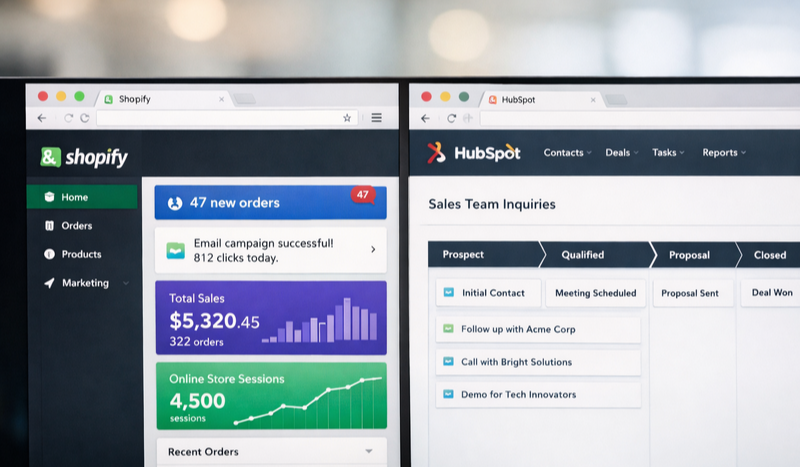
You're staring at two browser tabs. One shows your Shopify dashboard with 47 new orders from last night's email campaign. The other shows HubSpot, where your sales team is asking why those customers aren't showing up in their pipeline. Sound familiar? The Unific Shopify HubSpot integration solves this exact problem by creating a real-time bridge between your e-commerce platform and your CRM... automatically syncing customers, orders, and revenue data without the manual export-import dance.
As a certified HubSpot partner, we've helped dozens of e-commerce brands escape this particular brand of operational chaos. And if you're already running HubSpot but haven't connected it to your Shopify store, you're essentially flying blind on half your customer journey.
What Is Unific and Why Does It Matter for Your Shopify HubSpot Integration?
Unific is a middleware platform specifically designed to connect e-commerce platforms like Shopify with HubSpot's CRM and marketing tools. Think of it as a universal translator that speaks fluent Shopify and fluent HubSpot... converting order data, customer profiles, and purchase history into formats each platform understands.
Unlike generic integration tools like Zapier (which work through triggers and can miss data), Unific was built from the ground up for e-commerce use cases. It handles the nuances that matter - like attributing revenue to specific marketing campaigns, tracking customer lifetime value, and syncing abandoned cart data in real time.
According to HubSpot's State of Marketing Report, companies using integrated CRM and e-commerce data see 23% higher customer retention rates than those managing platforms separately.
For HubSpot admins managing dual platforms, the time savings alone justify the setup. We've seen clients reclaim 5-8 hours per week that were previously spent on manual data entry and reconciliation.
How Does the Unific Integration Actually Work?
Here's where it gets interesting. When a customer places an order on your Shopify store, Unific captures that transaction and pushes it to HubSpot within seconds. But it doesn't just create a contact record - it enriches that record with purchase context.
The integration creates or updates HubSpot contacts with:
- Complete order history including product names, quantities, and prices
- Customer lifetime value calculated automatically
- Order frequency and average order value metrics
- Abandoned cart status and recovery tracking
- Shipping and fulfillment status updates
This means your sales team sees the full picture when a contact lands in their queue. Your marketing team can segment based on actual purchase behavior, not just email clicks. And your service team knows exactly what a customer bought before answering their support ticket.
What Data Syncs Between Shopify and HubSpot?
The short answer - everything that matters for revenue attribution and customer intelligence. Unific syncs contacts bidirectionally, so updates in either platform reflect in the other. Orders flow from Shopify to HubSpot, creating deal records tied to the appropriate contact. Products sync as line items, giving you granular reporting on which SKUs drive the most revenue.
The platform also handles Shopify's draft orders, refunds, and fulfillment updates. If a customer returns an item, that adjustment appears in their HubSpot timeline automatically. No more surprises when sales calls a "high-value customer" who actually returned their entire purchase last month.
Step-by-Step Setup: Connecting Unific to Shopify and HubSpot
Let's walk through the actual setup process. Fair warning - this is more straightforward than most integrations, but you'll want to block about 45 minutes for initial configuration.
Step 1: Create Your Unific Account
Head to Unific's website and sign up for an account. They offer different tiers based on your order volume, so choose the plan that matches your current Shopify traffic. Most small to mid-size stores start with the Starter or Growth plan.
During signup, you'll select Shopify as your e-commerce platform and HubSpot as your CRM. This tells Unific which connection protocols to prepare.
Step 2: Connect Your Shopify Store
Unific uses Shopify's native OAuth authentication, so you won't need to dig around for API keys. Click the "Connect Shopify" button, enter your store URL (the myshopify.com version), and authorize the connection when Shopify prompts you.
Grant all requested permissions - Unific needs read access to customers, orders, and products to function properly. The connection typically establishes in under 30 seconds.
Step 3: Connect Your HubSpot Portal
Same process here. Click "Connect HubSpot," sign into your HubSpot account, and authorize Unific to access your portal. You'll need to be a Super Admin in HubSpot to complete this step, so loop in your ops team if you don't have those permissions.
Pro Tip: Before connecting, create a dedicated HubSpot user for the integration with its own email address. This makes it much easier to audit which changes came from Unific versus manual edits.
Step 4: Configure Your Sync Settings
This is where the magic happens - and where most people rush through and regret it later. Unific's settings panel lets you control exactly what syncs and how.
Key decisions to make:
- Historical data import - Do you want Unific to pull in all existing Shopify customers and orders? For stores with years of history, this can take several hours but creates a complete record.
- Contact matching rules - How should Unific handle duplicates? Email matching is standard, but you can add phone number or Shopify customer ID as secondary identifiers.
- Deal pipeline mapping - Which HubSpot pipeline should receive Shopify orders? Create a dedicated "E-commerce Orders" pipeline if you don't want them mixing with sales-generated deals.
- Property mapping - Unific creates custom properties in HubSpot for Shopify-specific data. Review these mappings to ensure fields like "Total Orders" and "Average Order Value" land where you expect.
Step 5: Test the Connection
Place a test order on your Shopify store using a personal email address. Within five minutes, that order should appear in HubSpot as a new contact with an associated deal. Check that all the expected data populated - order total, products, shipping address, and customer lifetime value.
If something looks off, Unific's sync logs show exactly what transferred and any errors encountered. Most issues trace back to permission problems or property mapping conflicts, both of which are quick fixes.
Advanced Unific Features Most E-commerce Brands Miss
Once your basic integration is running, you're capturing data. But the real power comes from using that data to drive automated marketing and sales workflows.
Can You Trigger HubSpot Workflows from Shopify Events?
Absolutely - and this is where Unific earns its keep. Because orders sync as HubSpot deals with status properties, you can trigger workflows based on purchase behavior.
Examples we've built for clients:
- Send a post-purchase email sequence when an order moves to "fulfilled" status
- Alert sales reps when a contact's lifetime value crosses a VIP threshold
- Trigger a win-back campaign for customers who haven't ordered in 90 days
- Add high-value customers to a Facebook custom audience automatically
The key insight here - HubSpot's workflow builder becomes infinitely more powerful when it has real purchase data to work with. You're no longer guessing which contacts are valuable; you know based on actual revenue.
Revenue Attribution and Closed-Loop Reporting
This one's a game-changer for proving marketing ROI. When Unific syncs orders with original source tracking, you can attribute revenue directly to the HubSpot campaign or traffic source that generated the sale.
Your reporting dashboard can now answer questions like: "How much revenue did our Q4 email campaign actually generate?" Not clicks, not conversions - actual dollars in the bank. This level of attribution clarity transforms how you build future campaigns because you know exactly what's working.
Common Integration Mistakes to Avoid
We've helped clean up plenty of botched Unific implementations. Here are the pitfalls we see most often.
Skipping the duplicate audit. If your HubSpot portal already has contact records from email signups, and Unific imports the same people from Shopify, you'll create duplicates unless matching rules are configured properly. Run a deduplication pass before going live.
Ignoring property conflicts. Shopify stores customer phone numbers in a specific format. HubSpot has its own phone number formatting. If these don't align, you'll end up with messy data that breaks segmentation. Review property mapping carefully.
Overcomplicating pipelines. Some teams create elaborate deal pipelines with 12 stages for e-commerce orders. In reality, most Shopify orders only need three to four stages - placed, paid, fulfilled, completed. Keep it simple or your reporting becomes unwieldy.
Pro Tip: Create a test HubSpot portal using their free tools tier to experiment with Unific configurations before touching your production environment. This sandbox approach saves headaches.
How Unific Compares to Native HubSpot Shopify Integration
You might be wondering - doesn't HubSpot offer its own Shopify integration? They do, and it's improved significantly over the years. But there are key differences.
HubSpot's native integration handles basic contact and order syncing. It's fine for simple use cases. However, Unific offers deeper customization - more granular property mapping, better historical data handling, and advanced features like abandoned cart recovery workflows.
The native integration also lacks some revenue attribution capabilities that Unific provides out of the box. If proving marketing ROI matters to your leadership team (and it should), the additional investment in Unific typically pays for itself within the first quarter.
For stores processing under 500 orders monthly with straightforward needs, the native integration might suffice. For growing brands with complex marketing stacks, Unific is the smarter choice.
Maintaining Your Integration Long-Term
Connecting the platforms is just step one. Keeping the integration healthy requires occasional attention.
Schedule monthly sync audits to verify data accuracy. Spot-check five to ten recent orders in HubSpot against Shopify to ensure amounts, dates, and customer details match. Discrepancies usually indicate a sync error that needs investigation.
Keep both platforms updated. When Shopify or HubSpot releases major updates, check Unific's changelog for compatibility notes. Most updates are seamless, but occasionally API changes require Unific to push connector updates.
Document your configuration. When your HubSpot admin leaves for a new role (it happens), the next person needs to understand why certain properties exist and how data flows. A simple integration map saves hours of reverse-engineering later. Your brand's operational clarity depends on documentation that survives personnel changes.
Getting Help with Complex Integrations
Some e-commerce setups require more than a standard Unific implementation. Multi-store Shopify configurations, custom HubSpot objects, or complex workflow requirements might need professional guidance.
Working with a certified HubSpot partner (like our team at LevelUp Digital) gives you access to specialists who've configured dozens of these integrations. We know the edge cases, the gotchas, and the shortcuts that turn a weekend project into a two-hour setup. Our approach prioritizes getting you to value quickly rather than overengineering solutions you don't need.
For technical implementation questions, our custom web development team handles everything from API configurations to building custom HubSpot integrations when off-the-shelf solutions don't quite fit.
Is Unific Worth the Investment for Small Stores?
Here's our honest take. If you're processing fewer than 100 orders monthly, the manual workload might not justify the subscription cost. You could manage with periodic CSV exports.
But once you cross 200-300 orders monthly, the math changes dramatically. The hours saved on data entry, the accuracy improvements, and the marketing capabilities unlocked by real-time data make Unific a clear ROI-positive investment. At that volume, you're likely spending 10+ hours monthly on manual sync work that Unific handles automatically.
Calculate your true cost of manual data management before deciding. Include not just admin hours but also the cost of delayed follow-ups, missed segmentation opportunities, and reporting gaps.
Next Steps: Launching Your Unific Integration
Start by auditing your current data state. How clean is your HubSpot contact database? How far back does your Shopify order history go? Knowing these baselines shapes your configuration decisions.
Then block time on your calendar - not for setup, but for planning. Decide which workflows you want to enable first, which team members need training, and how you'll measure success. A thoughtful 30-minute planning session prevents hours of rework later.
When you're ready to connect, head to Unific's platform and follow the steps outlined above. Most stores achieve a working integration within a single afternoon. The user experience is straightforward even for non-technical users.
And remember - integration is just the beginning. The real value comes from what you build on top of it: smarter segmentation, automated workflows, and finally... closed-loop revenue attribution that proves marketing's impact on the bottom line.
Ready to Level Up?
Need help connecting Shopify and HubSpot the right way? As a certified HubSpot partner, our team configures integrations that actually drive revenue - not just sync data.
Schedule a Free Strategy Call


 William McCulley
 Heather Harrington: Sep 21, 2026, 9:45:00 AM



%20-%202026-06-05T115117.920.png)