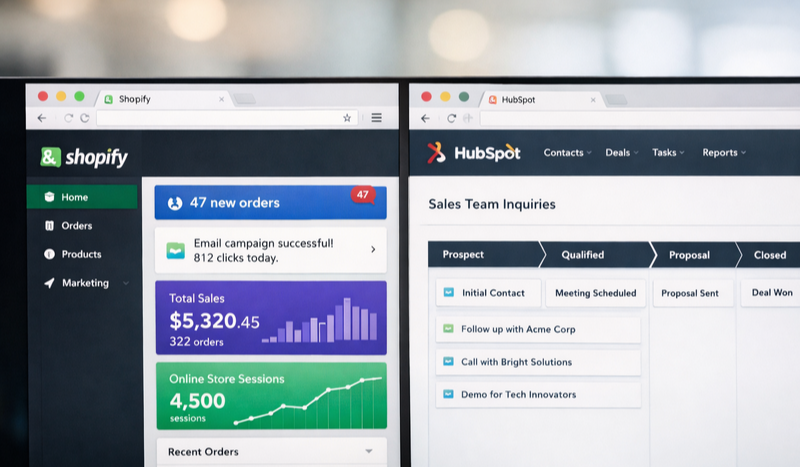
Unific for Shopify HubSpot Admins: Your Integration Questions Answered
11:19
You've spent months building out your HubSpot instance. Custom properties, lifecycle stages, lead scoring - the works. Meanwhile, your Shopify store is humming along, generating orders, capturing customer data, and doing its own thing in its own little world. And every time a customer places an order, you're left wondering... why doesn't HubSpot know about this?
If you're a HubSpot admin managing an ecommerce brand on Shopify, the Unific Shopify HubSpot integration might be the bridge you've been looking for. It syncs your store data - orders, customers, products, and more - directly into HubSpot, giving you a unified view of your customer journey from first click to repeat purchase.
But before you dive in, you probably have questions. Lots of them. Let's walk through the most common FAQs we hear from HubSpot admins evaluating Unific for their Shopify integration.
What Is Unific and How Does It Work with Shopify and HubSpot?
Think of Unific as a translator that speaks both Shopify and HubSpot fluently. It sits between your two platforms, listening for changes on either side and making sure both systems stay in sync.
When a customer places an order in Shopify, Unific doesn't just pass along the basics. It enriches HubSpot contact records with order history, product details, revenue data, and behavioral signals. According to HubSpot's own research, companies using integrated customer data see 23% higher customer satisfaction rates compared to those working with siloed systems.
The result? Your marketing team can finally segment by purchase behavior. Your sales team sees a customer's complete buying history before picking up the phone. And your reporting actually reflects the full customer journey - not just half of it.
What Data Does Unific Sync Between Shopify and HubSpot?
This is usually the first question HubSpot admins ask, and for good reason. The value of any integration lives or dies by what data it actually moves.
Unific syncs a comprehensive set of ecommerce data into HubSpot, including:
Customer data: Contact information, account creation dates, and customer tags from Shopify
Order data: Order details, line items, order status, fulfillment information, and complete purchase history
Product data: SKUs, product names, categories, and variant information attached to each order
Revenue metrics: Lifetime value calculations, average order value, total orders, and first/last purchase dates
Abandoned cart data: Cart contents, abandonment timestamps, and recovery status
What makes this powerful is that the data doesn't just sit in custom properties - it's structured in a way that makes it immediately usable for segmentation, automation, and reporting.
Can I Build Automations Based on Shopify Data in HubSpot?
Absolutely - and this is where things get interesting for HubSpot admins who love building workflows.
Once Unific syncs your Shopify data, you can trigger HubSpot workflows based on ecommerce behavior. Think about the possibilities: a post-purchase nurture sequence that kicks off the moment an order ships. A win-back campaign that targets customers who haven't ordered in 90 days. A VIP segment that automatically enrolls customers once they cross a lifetime value threshold.
If you're already comfortable with date-based workflows in HubSpot, you'll find plenty of new triggers to work with. First purchase anniversary emails, subscription renewal reminders, seasonal re-engagement campaigns based on last purchase date - all become possible when your order data lives in HubSpot.
Pro Tip: Start with one high-impact automation before building out a complex workflow library. A simple post-purchase thank you sequence with product care tips often outperforms elaborate multi-branch workflows - and it's much easier to troubleshoot.
Let's tackle the specific questions HubSpot admins ask most often when evaluating this integration.
Does Unific sync historical data or only new orders?
Unific can sync your historical Shopify data into HubSpot, not just new orders going forward. This is crucial for building accurate customer profiles from day one. When you first connect the integration, you can import past orders, customer records, and purchase history so your HubSpot instance reflects your complete ecommerce history.
How does the integration handle duplicate contacts?
Unific uses email address as the primary identifier to match Shopify customers with existing HubSpot contacts. If a customer already exists in HubSpot, the integration updates their record with Shopify data rather than creating a duplicate. For HubSpot admins who've fought the duplicate contact battle before, this matching logic is a relief.
Can I map Shopify data to custom HubSpot properties?
Yes - and this flexibility is what separates Unific from more basic integration options. You can map Shopify fields to existing HubSpot properties or create new custom properties specifically for your ecommerce data. This means you're not stuck with a rigid data structure that doesn't match how your team actually works.
What happens if there's a sync error or data conflict?
Unific includes error logging and sync status monitoring so you can identify and troubleshoot issues when they arise. The platform provides visibility into which records synced successfully and which encountered problems, along with details about what went wrong. No integration is perfect, but having clear error reporting makes a huge difference when you're managing the system.
Does Unific support bidirectional sync?
Unific primarily focuses on syncing Shopify data into HubSpot rather than pushing HubSpot data back to Shopify. For most ecommerce use cases, this one-way flow makes sense - your store is the source of truth for transactions, and HubSpot is where you act on that data for marketing and sales purposes.
How Does Unific Compare to Native HubSpot Shopify Integration?
HubSpot does offer a native Shopify integration, so you might wonder why anyone would choose a third-party option like Unific. The short answer: depth and flexibility.
Feature
Native HubSpot Integration
Unific
Historical data sync
Limited
Full historical import
Custom field mapping
Basic
Extensive customization
Revenue attribution
Standard metrics
Advanced LTV calculations
Abandoned cart tracking
Basic
Detailed cart data
Setup complexity
Simpler
More configuration options
The native integration works fine for brands with straightforward needs. But if you're running sophisticated marketing operations - multiple product lines, complex segmentation, detailed revenue reporting - Unific's deeper integration capabilities often justify the investment.
What Should HubSpot Admins Consider Before Implementing Unific?
Integration projects can go sideways fast if you don't plan ahead. Here's what we recommend thinking through before you flip the switch.
Audit your existing HubSpot properties first. Before adding a flood of new ecommerce data, make sure your property structure is clean. Do you already have custom properties that overlap with what Unific will create? Are your naming conventions consistent? A little cleanup now prevents headaches later.
Define your use cases before configuring. It's tempting to sync everything and figure out what to do with it later. Resist that urge. Start by identifying three to five specific things you want to accomplish with the integrated data. Maybe it's abandoned cart recovery emails, maybe it's VIP customer identification, maybe it's reporting on marketing-attributed revenue. Clear goals lead to cleaner implementations.
Plan your segmentation strategy. Having order data in HubSpot only matters if you're going to use it. Before the data starts flowing, map out the segments you want to create. First-time buyers vs. repeat customers. High-value vs. low-value. Product category aficionados. Building a solid keyword and targeting strategy for your marketing efforts becomes much easier when you know exactly how you want to slice your audience.
"The brands seeing the biggest ROI from Shopify-HubSpot integration aren't the ones with the fanciest setup - they're the ones who defined clear use cases before connecting a single data point."
Making the Most of Your Integrated Ecommerce Data
Connecting Shopify to HubSpot is just the starting line. The real value comes from what you do with that unified customer view.
Start with segmentation. Create lists based on purchase behavior - customers who bought in the last 30 days, customers who haven't ordered in 90 days, customers who've purchased from specific product categories. These segments become the foundation for personalized marketing.
Next, build workflows that would have been impossible without order data. Post-purchase email sequences, cross-sell campaigns based on past orders, loyalty program triggers based on lifetime value thresholds. If you're working with a data analytics team, they'll love having clean ecommerce data to work with for attribution modeling and customer behavior analysis.
Finally, close the loop on reporting. With revenue data in HubSpot, you can finally answer questions like: which marketing campaigns actually drove purchases? What's the lifetime value of customers acquired through different channels? How does email engagement correlate with repeat purchase rates?
Getting Started with Unific
If you've made it this far, you're probably seriously considering connecting your Shopify store to HubSpot through Unific. Here's the practical path forward.
First, visit Unific's website to review their current pricing and feature set. Integration platforms evolve, and you'll want to confirm the specific capabilities match your needs.
Second, document your requirements. What data do you need in HubSpot? What automations do you want to build? What reports do you need to generate? This requirements document will guide your configuration decisions.
Third, consider whether you need implementation support. Some HubSpot admins are comfortable configuring integrations themselves. Others prefer working with a partner who's done it before and can help avoid common pitfalls. Our team at LevelUp Digital has helped numerous ecommerce brands connect their tech stacks - and we've learned where the gotchas hide.
The gap between your Shopify store and your HubSpot CRM doesn't have to stay a gap. With the right integration in place, you can finally see your customers as whole people - not just contacts in one system and orders in another.
Ready to Level Up?
Need help connecting Shopify to HubSpot or building automation workflows that drive revenue? Let's talk through your integration strategy.
Picking a social media advertising agency when you're running a small or mid-sized business is a different game than it is for enterprise brands with...


 Heather Harrington
%20-%202026-03-27T093044.779.png)

 Heather Harrington: Sep 21, 2026, 9:45:00 AM