Hey, it's Heather—and I’m kicking off something new I think you’re going to love.
Starting today, I’m dropping a weekly HubSpot tip that’s actually useful. These aren’t the surface-level, “Did you know you can send an email?” kind of tips. I’m talking about real, strategic ways you can use HubSpot to save time, nurture leads, and drive revenue—starting the same day you read it.
Each week, I’ll walk you through one specific feature, explain exactly how to use it, and show you real-life ways to apply it. If there’s something specific you’ve been wondering how to do in HubSpot, drop a comment below and make sure you’re subscribed to the blog—because your question just might be next week’s tip.
Alright, let’s jump into one of the most underrated automations inside HubSpot: workflows based on date properties.
HOW TO SET UP A DATE-BASED WORKFLOW IN HUBSPOT
Before we dive into specific use cases, let me show you the steps to create a workflow trigger that runs based on a date property.
I recorded a quick walkthrough showing exactly how to do this inside HubSpot:
Watch the tutorial video here →
Or, follow these step-by-step instructions to set it up manually:
- Go to your workflows tool: In HubSpot, navigate to Automation > Workflows and create a new Contact-based workflow.
- Choose the workflow type:
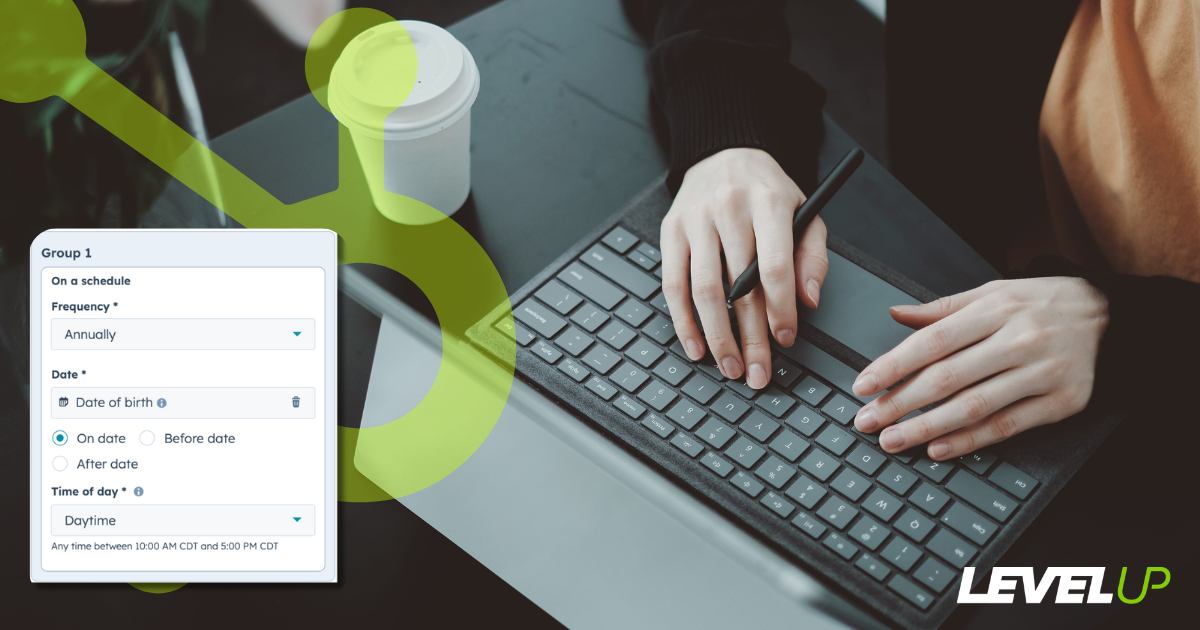
- If you're using the updated workflow builder, select "On a schedule" when choosing how your workflow should trigger.
- If you're using legacy workflows, look for the trigger type "Based on a date property" instead.
- Select your date property: HubSpot will prompt you to choose a specific property (like “Birthday,” “Renewal Date,” “Last Meeting Date,” etc.)—this is the date the workflow will anchor to.
- Set the timing of the trigger: You’ll have the option to start the workflow:
- On the exact date stored in the property
- Before or after that date (e.g., 7 days before)
- Choose how often it repeats: Depending on your use case, you can have the workflow run:
- One time only (great for onboarding or trial expirations)
- Daily or weekly (rare use cases)
- Annually (perfect for birthdays, anniversaries, and yearly renewals)
- Choose what time of day to execute: Morning, afternoon, a specific time of day... choose when you think is the best time for your automation to fire based on previous engagement reporting.
- Set re-enrollment rules: If you want the workflow to repeat (like every birthday), make sure you enable re-enrollment based on the same property.
- Build out your actions: Once the timing is set, add your workflow steps—like sending emails, creating tasks, setting delays, updating properties, or triggering internal notifications.
Once you’ve got your workflow centered around a date property, you can use it in all kinds of creative ways.
Let’s look at three of my favorites…
USE CASE #1:
BIRTHDAY EMAILS THAT BUILD TRUST
(NOT JUST SALES)
If you’re collecting birthdays in your forms and not using them in automation, you’re missing a golden opportunity. And no, this isn’t just for ecommerce brands handing out coupons (though it's amazing for that too).
Even in B2B—especially in B2B—remembering someone’s birthday can build a real human connection. It shows attention to detail. It makes your clients and contacts feel seen. And if you're in a high-trust sales cycle, those little moments matter.
Let me walk you through how to build this in HubSpot.
- Create the custom date property: Go to Settings > Properties, create a property called “Birthday,” and use the Date Picker field type.
- Collect birthday info: Add the property to your forms or manually update it during the sales process.
- Create the workflow: Use a contact-based workflow centered on the “Birthday” property.
- Set it to repeat: Check the option to re-enroll contacts annually.
- Add your actions: Send a personalized email with a discount (for e-commerce) or a thoughtful note (for B2B).
- Turn it on: Hit publish and let HubSpot do the remembering for you.
USE CASE #2:
CONTRACT RENEWAL REMINDERS THAT WORK
One of the biggest stressors in client retention? Keeping track of when contracts end. With a simple date property in HubSpot, you can automate follow-ups, upsell opportunities, or even alerts for your team—weeks before the renewal date.
I’ve implemented this with agencies, SaaS platforms, and consultants—and it consistently increases renewals and improves communication.
- Create the date property: Add “Contract End Date” or “Renewal Date” in your properties.
- Update the record: Make it a deal or contact property, depending on how you track client renewals.
- Build the workflow: Center it on the renewal date, and schedule your emails to go out 30, 15, and 7 days before.
- Add internal reminders: Create tasks or internal emails for the account owner to follow up personally.
- Repeat (if needed): If renewal happens on the same date every year, you can auto-enroll contacts annually.
USE CASE #3:
MEETING FOLLOW-UPS THAT ACTUALLY HAPPEN
How many times have you finished a great discovery call and then... forgot to follow up, or even schedule a follow-up? It happens. But you can fix it by using a “Last Meeting Date” property and automating your follow-ups based on that timestamp. You can boost efficiency by reducing the workload on sales to schedule their own follow-up tasks, or use the workflow as a failsafe in case of a busy day!
Perfect for busy sales teams or account managers who need a consistent post-meeting process.
- Create the date property: Add “Last Meeting Date” as a custom date picker field.
- Keep it updated: Use integrations like Google Calendar, or have reps log it after each meeting.
- Build the workflow: Center it on “Last Meeting Date,” and trigger actions 3, 7, or 14 days later.
- Add personalization: Use tokens to pull in the rep’s name or the meeting topic.
- Evaluate engagement: Use if/then branches based on email opens or clicks to customize the next step.
OTHER IDEAS TO EXPLORE:
- Onboarding anniversaries – trigger check-ins at 30/60/90 days
- Product purchase dates – send refills, upsells, or reviews
- Event follow-ups – based on attendance or registration date
- Trial expiration – send upgrade reminders before the trial ends
- Client milestones – celebrate 1, 3, or 5-year anniversaries
- Not ready yet - set re-warming sequences for lost deals due to timing
Want more HubSpot tips like this?
This is just the beginning.
If you found this helpful, make sure to subscribe to the Brainwaves & Breakthroughs Blog and leave a comment below with the next feature you’d love a tutorial on. Whether it’s workflows, reporting, email hacks, or something super niche—I’m here to help you make the most of HubSpot.
Let’s level up your automation, one weekly tip at a time.
—Heather



 Heather Harrington
 Heather Harrington: Sep 21, 2026, 9:45:00 AM